
Droid SMS
SMS notifications through the Czech gateways GoSMS and SMSbrána: order status messages for WooCommerce customers, alerts for the staff.
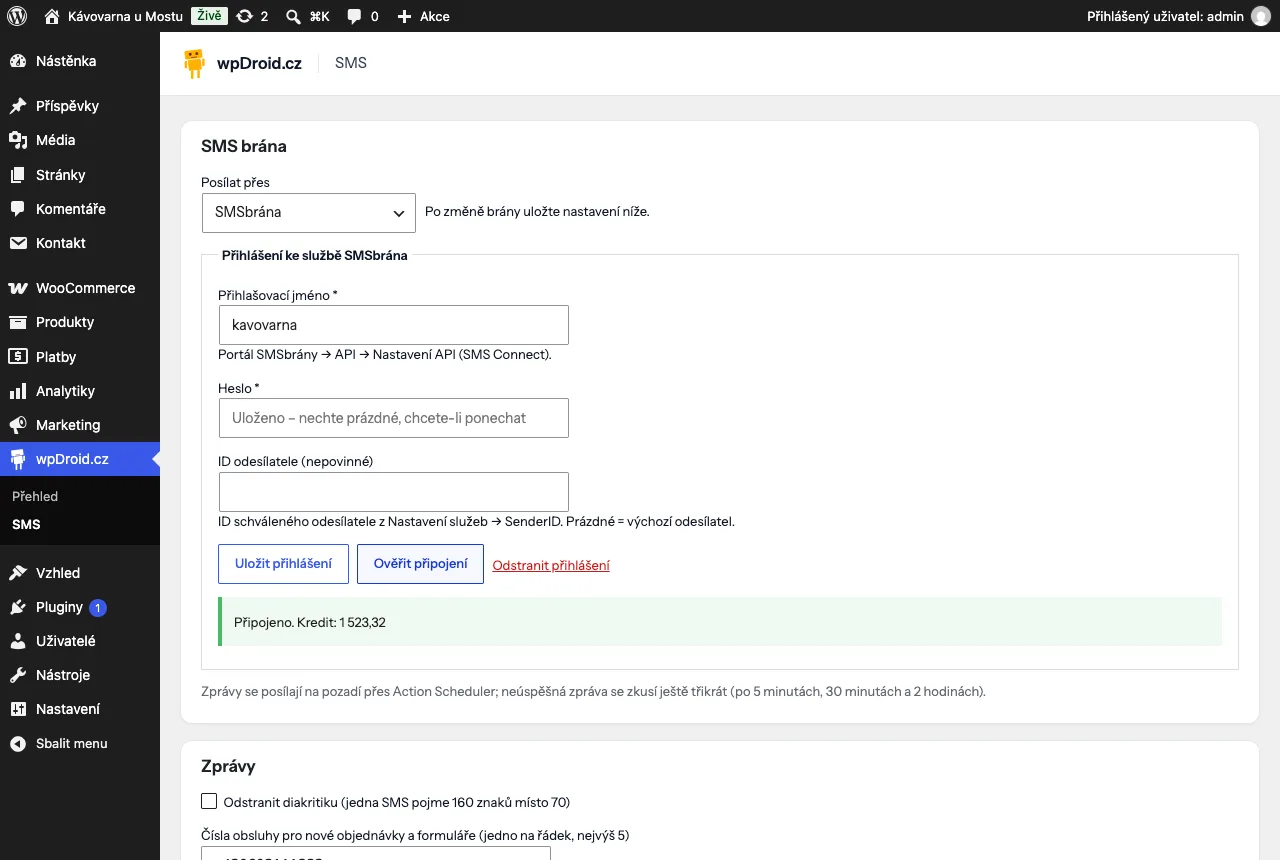
- Gateways: GoSMS.eu and SMSbrána.cz. Choose one, enter its login and check the connection (the credit is shown).
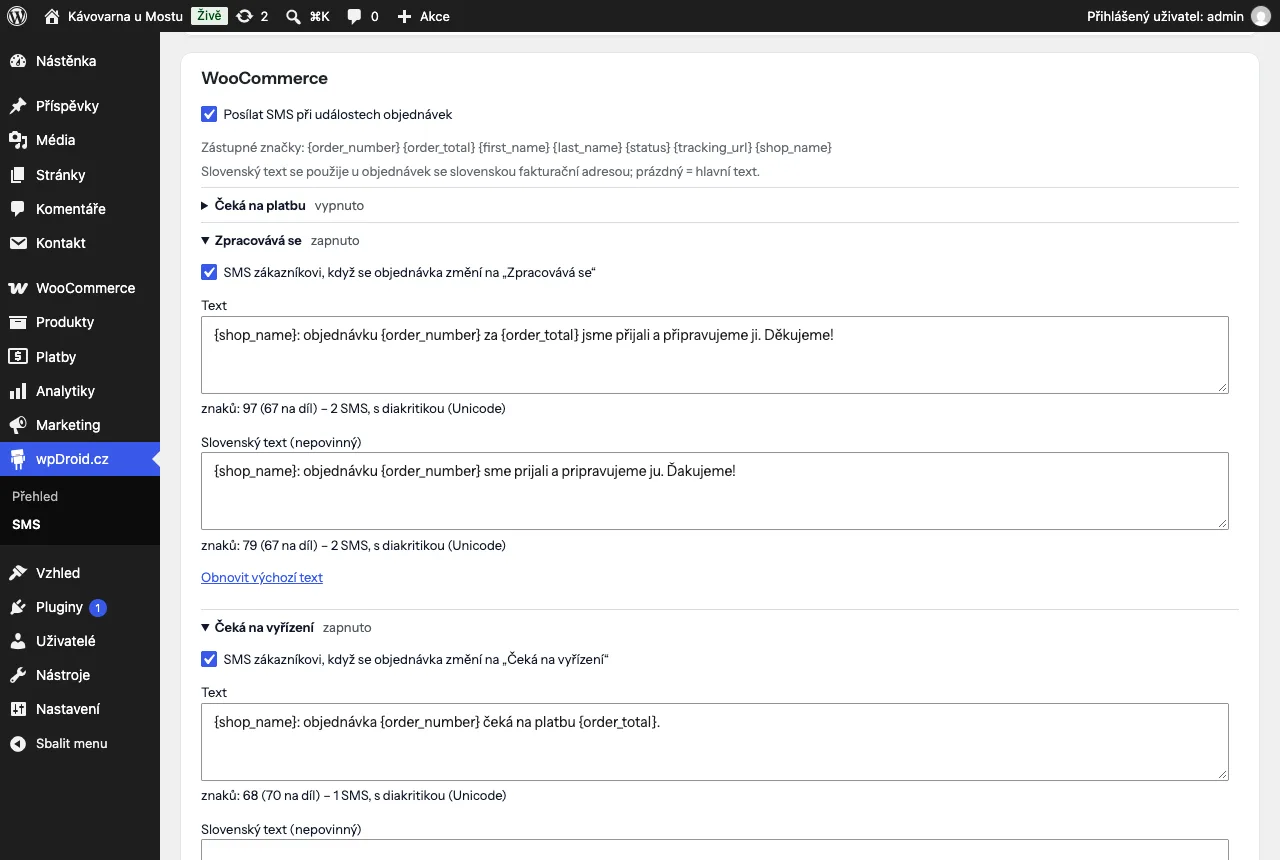
- WooCommerce: one SMS template for each order status, with an optional Slovak text for orders with a Slovak address. Placeholders
{order_number},{order_total},{first_name},{last_name},{status},{tracking_url},{shop_name}. - Tracking link:
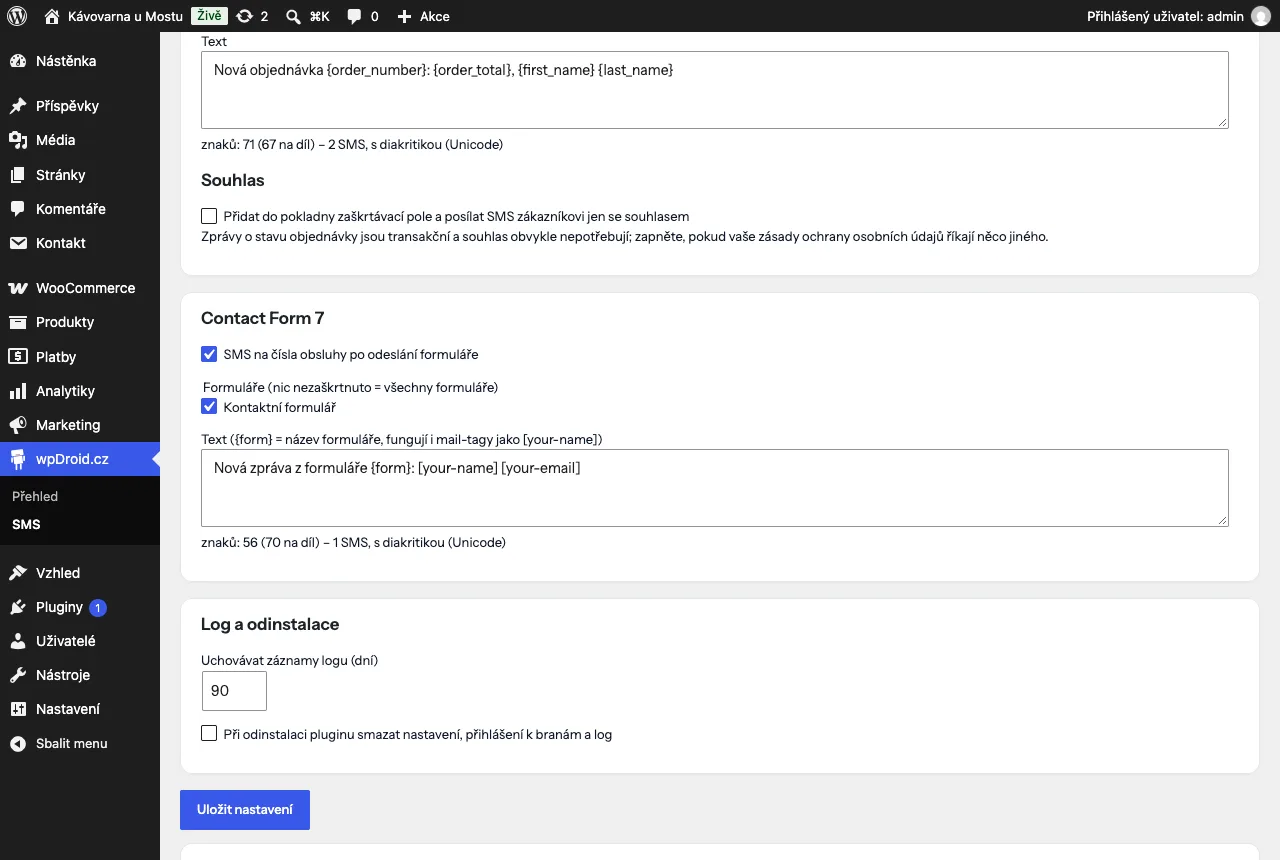
{tracking_url}takes the latest parcel from Droid Shipping Info; other plugins can supply it through thedroid_sms_tracking_urlfilter. - Staff alerts: SMS to up to five staff numbers when a new order is placed or a Contact Form 7 form is sent (Contact Form 7 mail-tags such as
[your-name]work in the text). - Phone numbers: converted to the international format (+420, +421; Slovak numbers with the leading zero too). Invalid or landline numbers are skipped and logged.
- Character counter in every template: characters, parts of the message and whether it uses diacritics (70 instead of 160 characters per SMS). Optionally the plugin removes diacritics before sending.
- Background sending: messages go through a queue (Action Scheduler, or WP-Cron without WooCommerce). An outage of the gateway never delays the order or the form; the message is retried three times (after 5 minutes, 30 minutes and 2 hours).
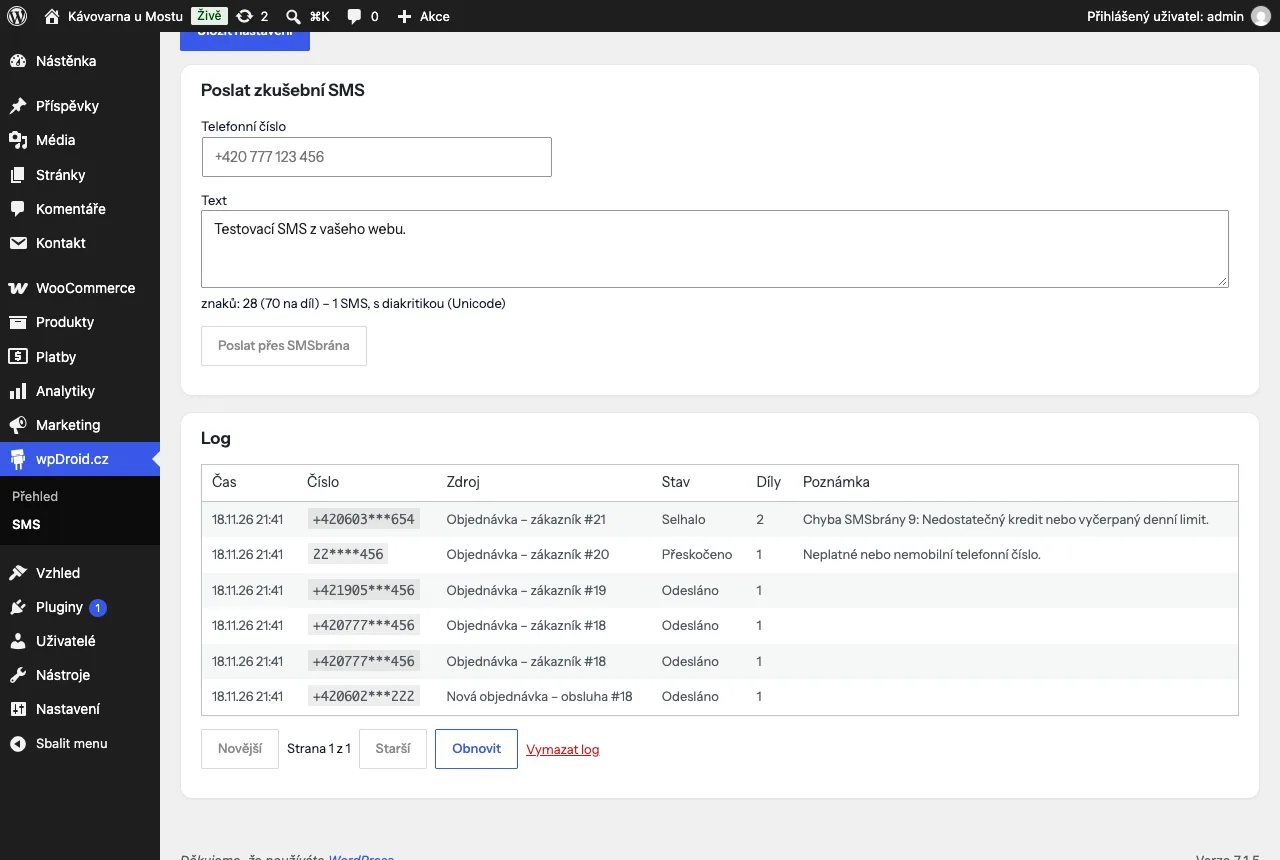
- Log with the time, a shortened number, the source, the result and the number of parts, and a "Send a test SMS" button.
- Consent (optional): a checkbox in the classic and the block checkout; customer SMS are then sent only with consent.
- For developers: filters
droid_sms_should_send,droid_sms_placeholders,droid_sms_tracking_url,droid_sms_providers(own gateway implementingSmsProvider), actionsdroid_sms_sentanddroid_sms_failed.
Licence
Droid SMS is a paid plugin distributed from wpdroid.cz with a yearly licence for 1 site or 5 sites (Agency). The licence gives you updates and support for its term. The plugin keeps working after the licence expires, only without updates: SMS messages are sent the same with or without a valid licence and while the licence server is down.
External services
The plugin sends SMS through the gateway you choose. Nothing is sent before you choose a gateway and enter its login.
GoSMS.eu
When an SMS is sent or the connection is checked, the plugin calls https://app.gosms.eu (an access token with your client ID and secret, then the message with the recipient's phone number, the text and the channel ID, or a request for the credit). Service of GoSMS s.r.o., terms and privacy policy at gosms.eu.
SMSbrána.cz
When an SMS is sent or the connection is checked, the plugin calls https://api.smsbrana.cz/smsconnect/ (when it cannot be reached, https://api-backup.smsbrana.cz/smsconnect/) with your login, a one-time hash of the password, the recipient's phone number, the text and the message id, or a request for the credit. Service of ProfiSMS s.r.o., terms and privacy policy ("Obchodní podmínky", "Informační memorandum") at smsbrana.cz.
wpDroid.cz plugin catalog
The shared wpDroid.cz → Overview page loads the list of wpDroid.cz plugins from https://wpdroid.cz/api/wp/catalog, only when an administrator opens that page, at most once every 12 hours. No site or visitor data is sent; like every WordPress HTTP request it carries the WordPress version and the site address in the User-Agent header. The catalog is provided by wpDroid.cz.
Licence and updates (wpdroid.cz)
The licence key is checked at https://wpdroid.cz/api/v1 when you activate or deactivate it and once a day afterwards; the request carries the licence key, the product, the plugin version, the PHP version and the site domain. WordPress asks https://wpdroid.cz/api/v1/update/droid-sms for new versions about twice a day. No content of the site and nothing about customers, orders or messages is sent. The service is provided by wpDroid.cz.
Screenshots
What you get
- Droid SMS plugin to download from your customer account
- Licence key for one site (Agency licence: five sites)
- Updates right in the WordPress admin while the licence is valid
- E-mail support while the licence is valid
Installation
- Download the plugin from wpdroid.cz, then in Plugins → Add New Plugin → Upload Plugin upload the zip and activate it.
- Open wpDroid.cz → SMS, choose the gateway, enter the login from the gateway's portal and click "Check connection".
- Save the settings, turn on the order statuses you want and send a test SMS.
- Enter the licence key at the bottom of the same screen (updates and support).
Common questions
- Can I move the licence to another site?
Yes. Deactivate the domain in the customer portal and use the freed slot elsewhere.
- What happens if I do not renew?
Your site keeps running and the plugin stays installed and working. After a 14-day grace period, updates and support stop. The exception are add-ons where the licence unlocks Pro features (Droid ČNB Pro, Droid MCP Bridge Pro): there those features switch off after the grace period too. Renewing switches everything back on and the key stays the same.
- Can I get a refund?
You may withdraw within 14 days of the purchase until you ask in the customer portal for the licence key and the downloads to be released — that ends the right of withdrawal. If the product does not work as described, get in touch — that is a defect and it gets fixed.
- Will I get a tax document?
Yes, sent to the e-mail on the order. Businesses from another EU country with a valid VAT ID buy under the reverse charge mechanism.
- How much does the plugin cost?
690 CZK a year for 1 site, Agency licence for 5 sites 2,490 CZK a year (prices excl. VAT). Updates and support for the term of the licence are included.
- Does sending SMS depend on the licence?
No. Messages are sent the same with an expired licence and while the licence server is down. The licence affects only updates and support; sending never talks to a server of wpdroid.cz.
- Where do I get the login credentials?
GoSMS: in the self-service portal at app.gosms.eu you will find the client ID and the client secret; the channel ID determines the sender. SMSbrána: in the portal, open API → API settings, activate SMS Connect and copy the login name and password. If you have restricted the API to IP addresses, add the address of your web server.
- An SMS did not arrive. What should I check?
Open the log on the settings page. “Pending” means another send attempt is scheduled. “Failed” shows the reason given by the gateway. “Skipped” means the number was not a valid mobile number.
- Will a gateway outage hold up an order?
No. SMS messages are sent in the background, so the order and the form go through immediately. If the gateway is down, the plugin retries the message after 5 minutes, 30 minutes and 2 hours.
- Why is my SMS counted as two?
A message with diacritics or special characters holds 70 characters (67 per part of a longer message); without them, 160 (153). Turn on “Remove diacritics” and more text will fit into one SMS.
- Does the customer have to consent to SMS?
Messages about an order the customer placed themselves are usually transactional and do not need consent. If your privacy policy says otherwise, enable the consent checkbox in the checkout. The plugin does not support marketing campaigns.
- Will the plugin send the customer a shipment tracking link?
Yes, if you use the Droid Shipping Info plugin – the
{tracking_url}placeholder takes the latest shipment of the order. Other plugins can supply the link via thedroid_sms_tracking_urlfilter.- Does the plugin work without WooCommerce?
Yes. Without WooCommerce, it sends SMS to staff after a Contact Form 7 form is submitted, and the queue runs via WP-Cron.
- What data does the plugin send?
Only to the selected gateway, and only once the credentials have been entered. When sending an SMS: the recipient’s phone number, the message text and your credentials (GoSMS receives the client ID and client secret for the access token and the channel ID; SMSbrána receives the login name and, instead of the password, a one-time hash). When verifying the connection, a credit balance query. For SMSbrána, its fallback address is used if it is unavailable. After sending, the log on your site keeps only the shortened number, source, status and number of parts. Only the licence check (key, product, plugin and PHP version, site domain) and the update check go to wpdroid.cz.