
Droid Booking System
A booking system for apartments, cabins, guesthouses and other units – you choose what to call them. Guests see availability in a calendar, pick their dates with a click and send an enquiry. You confirm it in the admin, and only then are the dates written into the calendar. No Contact Form 7, no other plugins and no scripts from third-party servers.
Droid Booking System is a booking module for smaller accommodation: apartments, cabins, cottages and guesthouses. The default name for units is "Apartments", but you can change it in the settings (for example to Cabins, Rooms or Cottages) – your name then shows in the menu and across the admin. It needs no other plugin and no external service. The calendar, the enquiry form and the admin are all part of the plugin.
How it works
- The guest sees the availability calendar on your site and picks dates by clicking the arrival and departure days.
- They fill in the enquiry form. The plugin checks the stay rules and availability and saves the enquiry.
- Both you and the guest get an e-mail with a summary.
- You confirm the enquiry in the admin. Only confirmed dates show as booked in the calendar on your site.
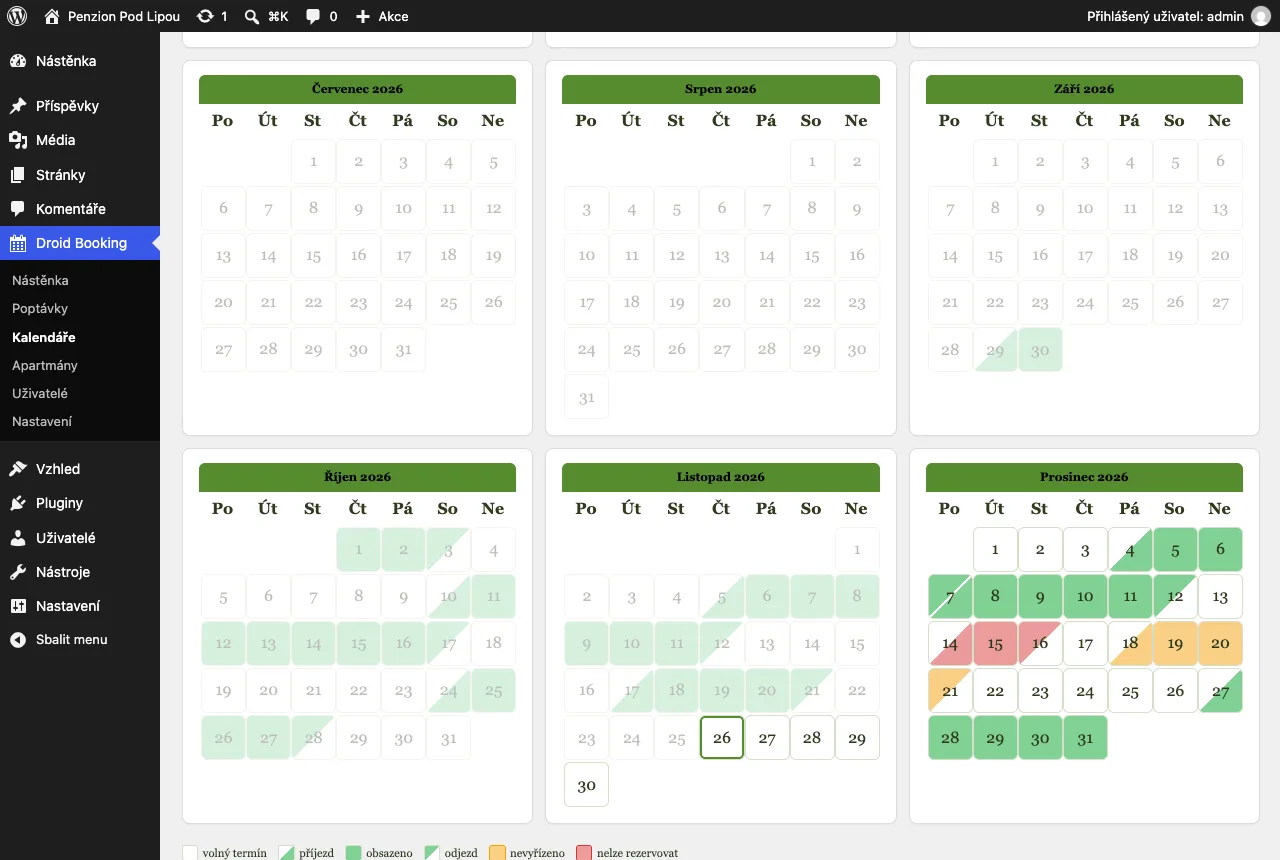
An unconfirmed enquiry does not block the calendar on your site – you decide what is booked. In the admin calendar you still see it as pending (orange), so you know what is in play. Dates you want to block (maintenance, your own stay) are created with the status Not bookable – booked on the site, red in the admin and without guest contact details.
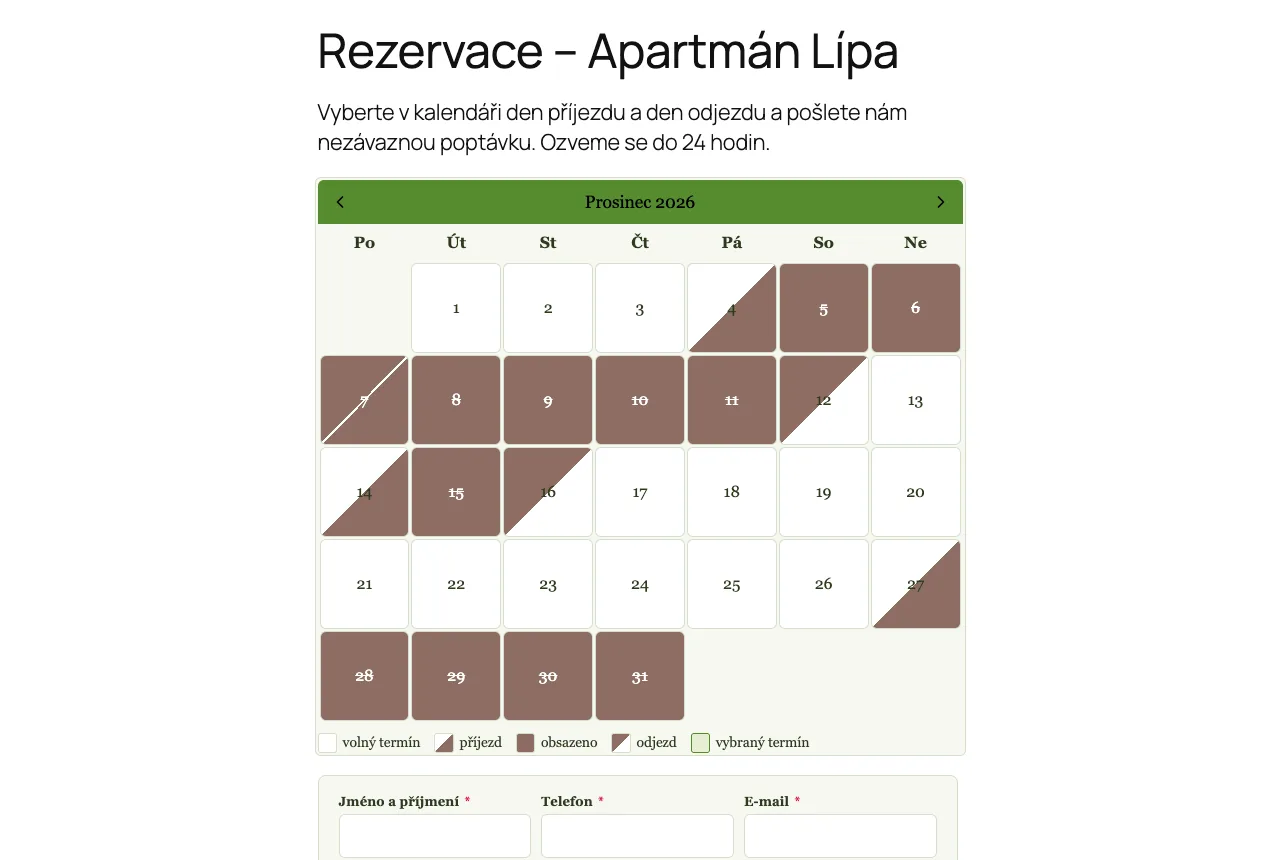
Availability calendar
- Shortcode
[droidbookingcalendar]for any unit, several calendars on one page. - Arrival and departure days are drawn as half days, so one guest can leave and another arrive on the same day.
- Date selection with a click, also across month boundaries. Days that cannot be selected (booked, outside the minimum or maximum stay) are dimmed.
- Keyboard control and labels for screen readers. The state of a day is never shown by colour alone.
Enquiry form
- Shortcode
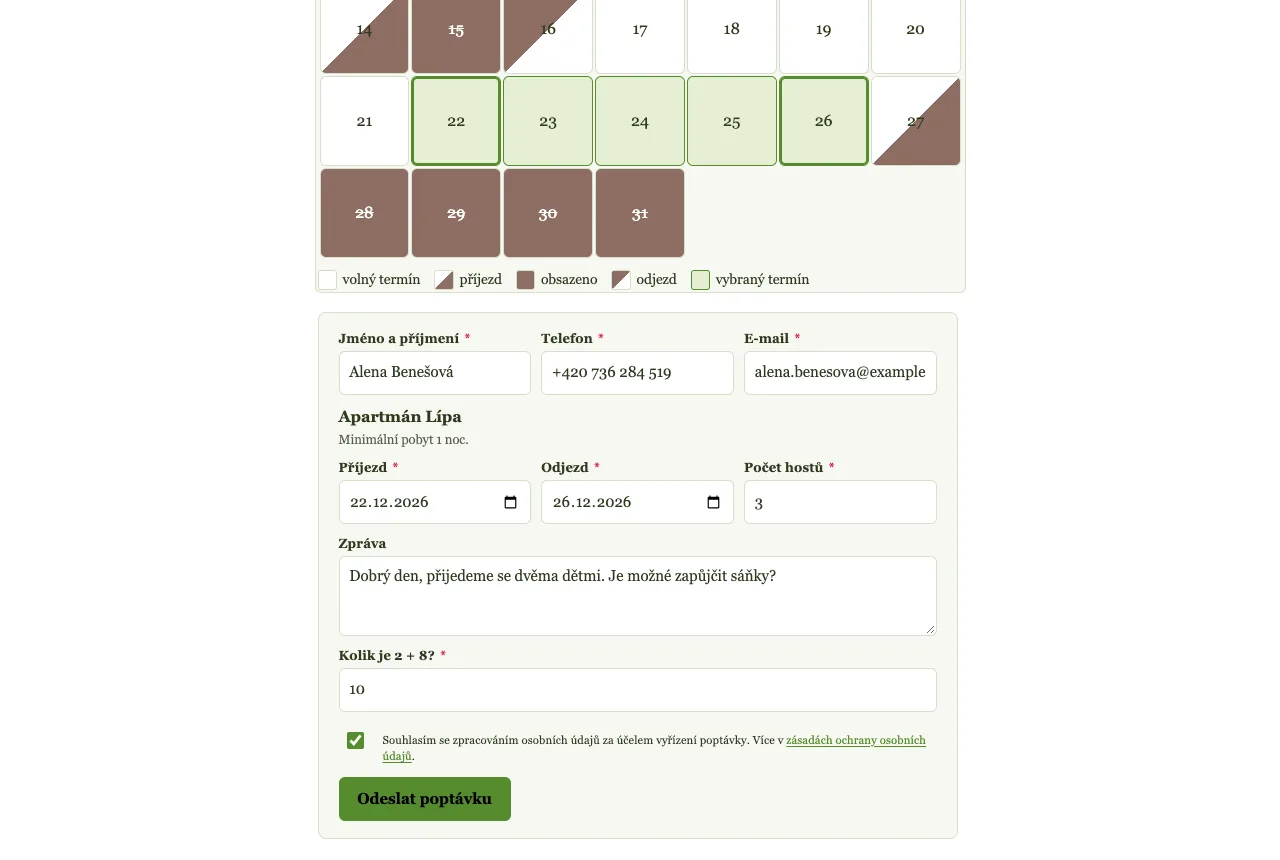
[droidbookingform], with a unit picker or fixed to one unit. The field label matches the name you set in the settings. - Checks required fields, a valid e-mail and phone, the number of guests against capacity, the minimum and maximum number of nights, the booking horizon and collisions with confirmed stays. All errors are shown at once next to their fields.
- Works with cached pages and with JavaScript turned off.
- Consent to personal data processing with a link to your privacy policy. The time of consent is stored with the enquiry.
- After sending, it redirects to your thank-you page or shows a confirmation in place of the form.
Spam protection
An invisible honeypot, a fill-in time check and a per-IP submission limit always run. IP addresses are not stored in readable form. On top of that you choose one visible protection:
- a maths question (default, no sign-up and no keys),
- Cloudflare Turnstile,
- Google reCAPTCHA v2 or v3.
When the service is down or the keys are missing, the form falls back to the maths question so the guest is never locked out.
Units and stay rules
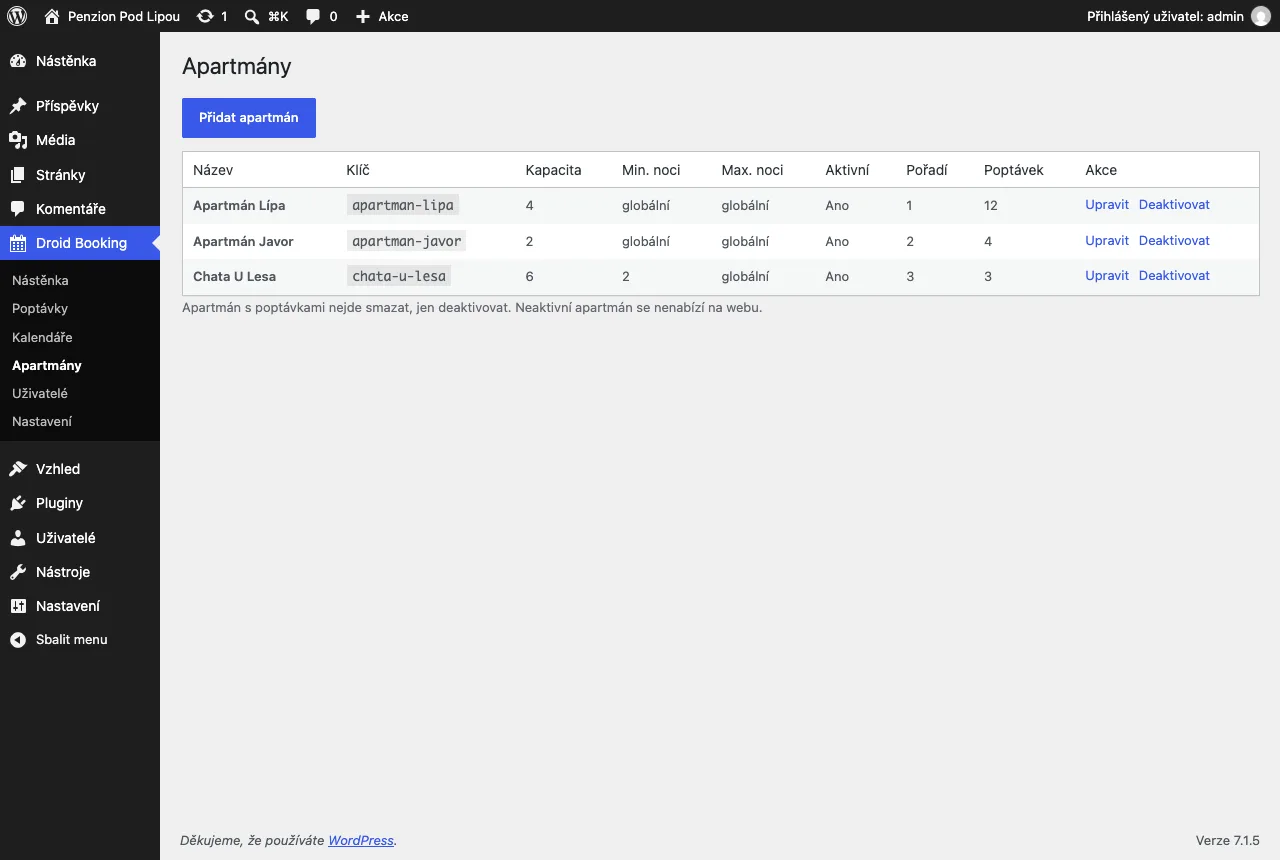
- Any number of units (labelled Apartments by default) with their own capacity and order. An inactive unit is not offered on the site, but its enquiries stay in the admin.
- In Settings → General you set the singular and plural name (for example Apartment / Apartments, Cabin / Cabins). The change shows in the left menu, headings and the form.
- Set the minimum and maximum number of nights globally and override them per unit.
- Booking horizon: how far ahead guests can enquire (2 years by default).
Admin
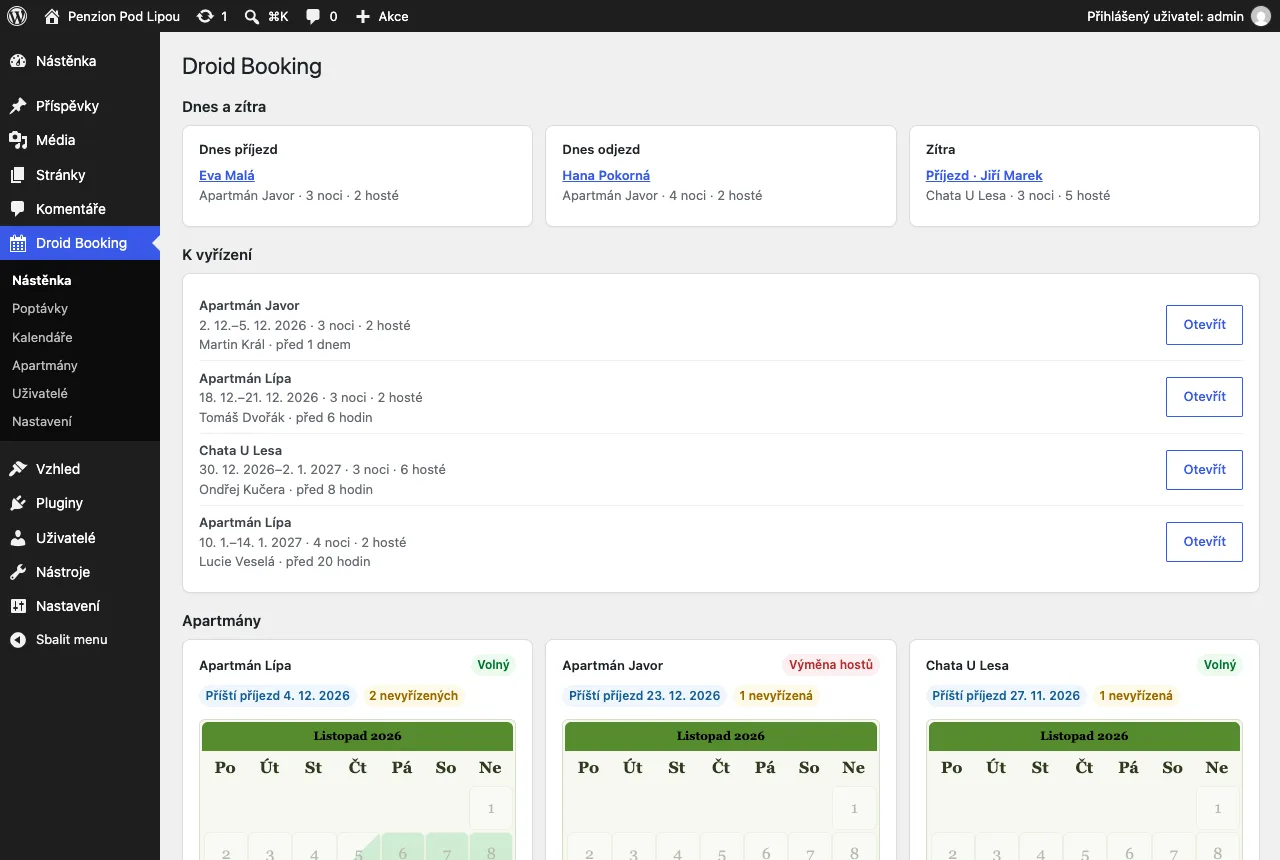
- Dashboard: today's and tomorrow's arrivals and departures, pending enquiries sorted by date, a card for each unit with its status and a month calendar (confirmed in green, pending in orange, blocks in red) and the five latest enquiries.
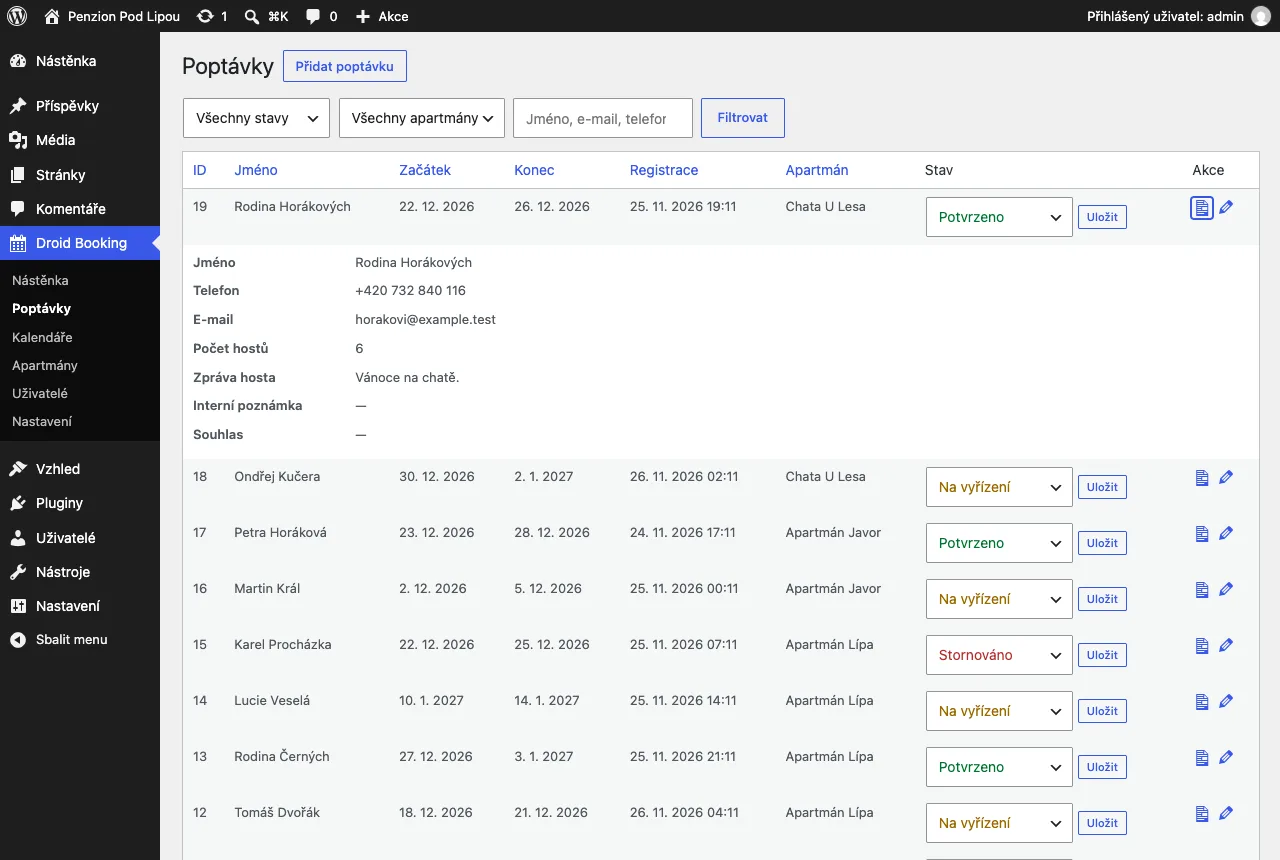
- Enquiries: search, filters, sorting, detail and editing. Add a new enquiry or a date block by hand with Add enquiry. Change the status with one click right in the list (Pending, Confirmed, Cancelled, Not bookable). Every change is saved to the history.
- Collision check: dates that would overlap another confirmed enquiry or block cannot be confirmed. The plugin shows which enquiry collides and saves nothing. Two simultaneous confirmations never cross each other in the calendar.
- Calendars: the whole year month by month for each unit; the guest's name and contact on confirmed days, clear colour coding and hover hints for pending enquiries and blocks.
- Users: an overview of guests built from enquiries, with e-mail and phone.
- Settings: unit name, owner e-mail and sender, thank-you page, stay rules, form protection and the texts of both e-mails with placeholders.
Appearance
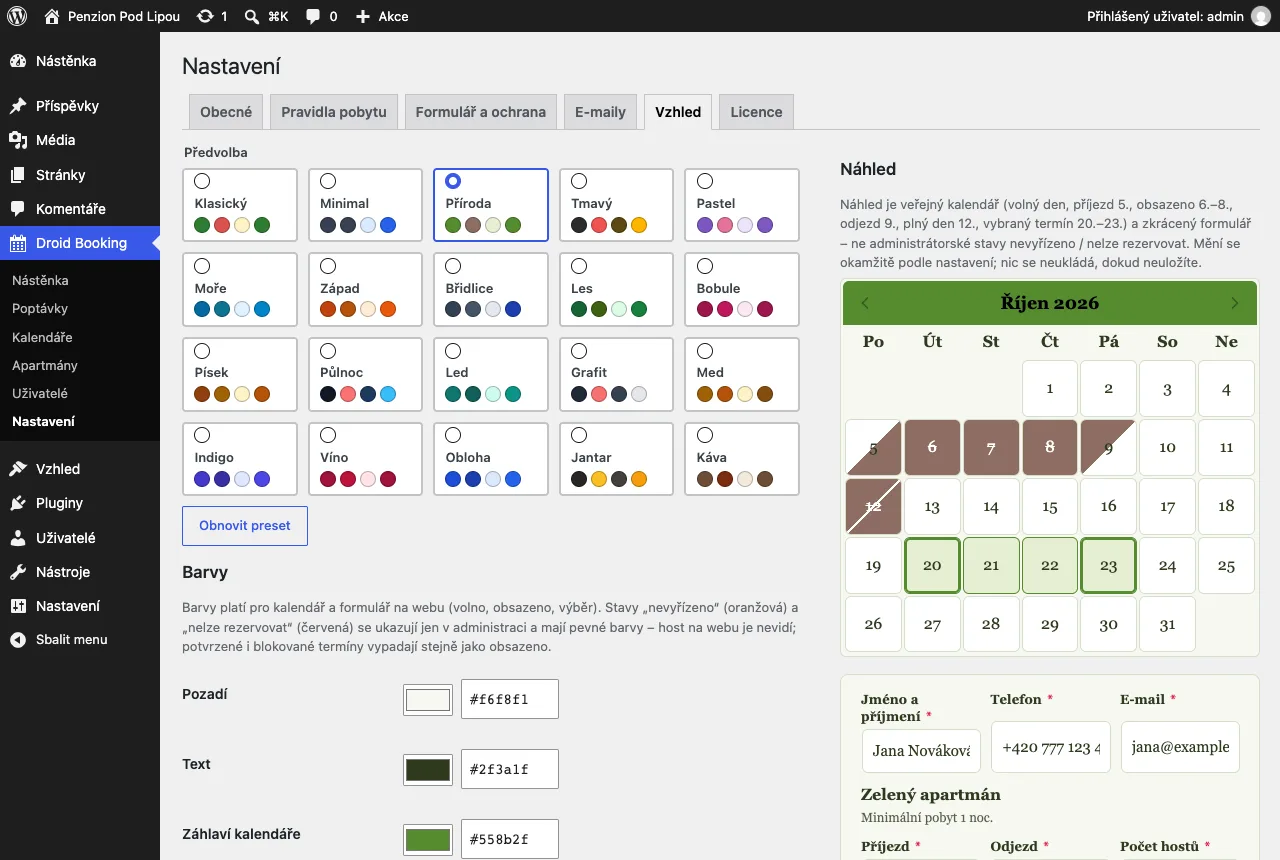
Twenty ready-made styles (Classic, Minimal, Nature, Dark, Pastel, Sea, Sunset, Slate, Forest, Berry, Sand, Midnight, Ice, Graphite, Honey, Indigo, Wine, Sky, Amber, Coffee). Each meets the WCAG AA contrast of 4.5 : 1. Adjust colours, font, size, corner radius, spacing, arrows and the arrival/departure style and see the change at once in a live preview. If your own colours drop the contrast below 4.5 : 1, the preview warns you. Fonts are system fonts – nothing is loaded from Google Fonts.
Technical
- A light front end without jQuery or a framework; scripts and styles load only on pages with the calendar or the form.
- Everything ships with the plugin, nothing is loaded from a CDN.
- Czech, ready for translation.
- The plugin offers suggested text for your privacy policy in the WordPress privacy policy guide.
- Updates right in the WordPress admin with a valid licence.
Licence
The licence covers one site, the Agency licence five sites. The calendar and the form on your site always work, even without a licence, so guests never hit a broken page. A valid licence unlocks:
- enquiry detail and editing, search by e-mail and phone,
- the guest's name and contact in the availability calendar and the guest overview,
- appearance settings for the calendar and the form,
- updates right in the WordPress admin.
Without a licence you can still confirm and cancel enquiries right in the list and create new ones, blocks included. When the licence expires, the site keeps full functionality for another 14 days so you have time to renew.
Requirements: WordPress 6.4 or newer, PHP 8.1 or newer, MySQL 8.0 or MariaDB 10.6 or newer.
Screenshots
What you get
- Droid Booking System plugin to download from your customer account
- Licence key for one site (Agency licence: five sites)
- Full enquiry management, guest contacts and appearance settings while the licence is valid
- Updates right in the WordPress admin while the licence is valid
- Availability calendar, enquiry form and enquiry management without other plugins
- Manual enquiries and date blocks (Not bookable status)
- Your own unit name (Apartments, Cabins, …) in the menu and admin
- Spam protection including support for Cloudflare Turnstile and Google reCAPTCHA
- Twenty appearance styles with a live preview
- Czech throughout the plugin
Installation
1. Installation
- Download the plugin ZIP from your account on wpdroid.cz and copy your licence key.
- In the WordPress admin open Plugins → Add New → Upload Plugin, choose the downloaded ZIP and click Install Now.
- Activate the plugin. Activation creates its database tables; nothing else is installed.
Do not unzip the file. Install the whole ZIP as you downloaded it.
2. Licence activation
Open Droid Booking → Settings → Licence, paste your licence key and click Activate. The licence is activated for your site's domain. Without an active licence the calendar and form on your site work, but the admin lacks enquiry detail and editing, guest contacts and appearance settings. When moving to another domain, deactivate it on the old site first.
3. Units (Apartments)
In Droid Booking → Settings → General you can change the default names Apartment / Apartments (for example to Cabin / Cabins). After saving, reload the page – your name shows in the menu and headings.
In Droid Booking → Apartments (or under your name) add units: name, capacity and optionally your own minimum and maximum number of nights. The key (for example table-no-1) is filled in from the name and used in shortcodes.
4. Calendar and form on your site
Put the shortcodes on a page:
[droidbookingcalendar typ="green-apartment"]
[droidbookingform typ="green-apartment" zamknout="1"]
or just the calendar with the form opening after dates are picked:
[droidbookingcalendar typ="green-apartment" formular="1"]
[droidbookingcalendar]without attributes shows the first active unit (preview only).formular="1": after arrival and departure are picked, the enquiry form opens below the calendar. If[droidbookingform]is also on the page, the form shortcode takes precedence.[droidbookingform]without attributes offers a unit picker; it also works without the calendar (dates typed by hand).- Calendar + form with the same
typ: the guest picks dates by clicking in the calendar.
5. Settings
In Droid Booking → Settings check:
- General: unit name (singular and plural), the e-mail that receives enquiries and optionally a thank-you page.
- Stay rules: global minimum and maximum nights and the booking horizon.
- Form and protection: consent text, the privacy policy page (where the link in the form leads) and the protection method. The default maths question works straight away. For Turnstile or reCAPTCHA, paste the keys from your account with that service and mention the service in your privacy policy.
- E-mails: texts of the e-mails to the owner and the guest.
- Appearance: style of the calendar and the form.
Recommendations
- For reliable e-mail delivery, send mail via SMTP (for example with an SMTP plugin or your hosting's service). Droid Booking sends e-mails with the standard WordPress function.
- Site behind Cloudflare or a reverse proxy: in Settings → General turn on reading the IP address from the proxy header so the submission limit counts real visitors.
- Pages with the form can stay cached. The form requests a valid security token by itself when it loads.
- Create a date block (maintenance, your own stay) in Enquiries → Add enquiry with the status Not bookable.